
Key takeaways
- One question touches six places. A single AI request moves agency data through the prompt, retrieval, connected tools, the model provider, the answer, and the logs. Each is a separate place it can end up where it shouldn't.
- Most leaks need no hacker. They come from a default setting nobody changed, permissions nobody cleaned up, or a habit nobody was trained out of.
- "Not used for training" is not "not retained." Read the contract for how long the provider keeps your prompts, and get counsel's answer on whether they're public records.
It's 0600 and a shift supervisor has fifteen minutes before briefing. Overnight there were three calls to the same address on Oak Street: a domestic disturbance, a welfare check, and a medical call that ended in a transport. She opens the agency's AI assistant and types:
Summarize last night's calls to 1400 Oak Street, including what the caller told the call-taker, and draft talking points for the day shift.
Thirty seconds later she has a clean summary and five bullet points. It reads well. It saves her twenty minutes.
In those thirty seconds, that question touched six places where agency data can end up somewhere it shouldn't. None of them require a hacker. Most of them require nothing more than a default setting nobody changed, or a habit nobody was trained out of.
This article follows that one question from the keyboard to the answer and back into the agency's records. At each step it explains what the tool is doing in plain terms, where the risk sits, and what an agency can do about it. It's written for chiefs, directors, and supervisors as much as for IT staff, so every acronym is explained where it first appears, and there's a list of terms at the end. If you're newer to these tools, The AI Questions Public Safety Agencies Don't Want to Ask covers the basics first.
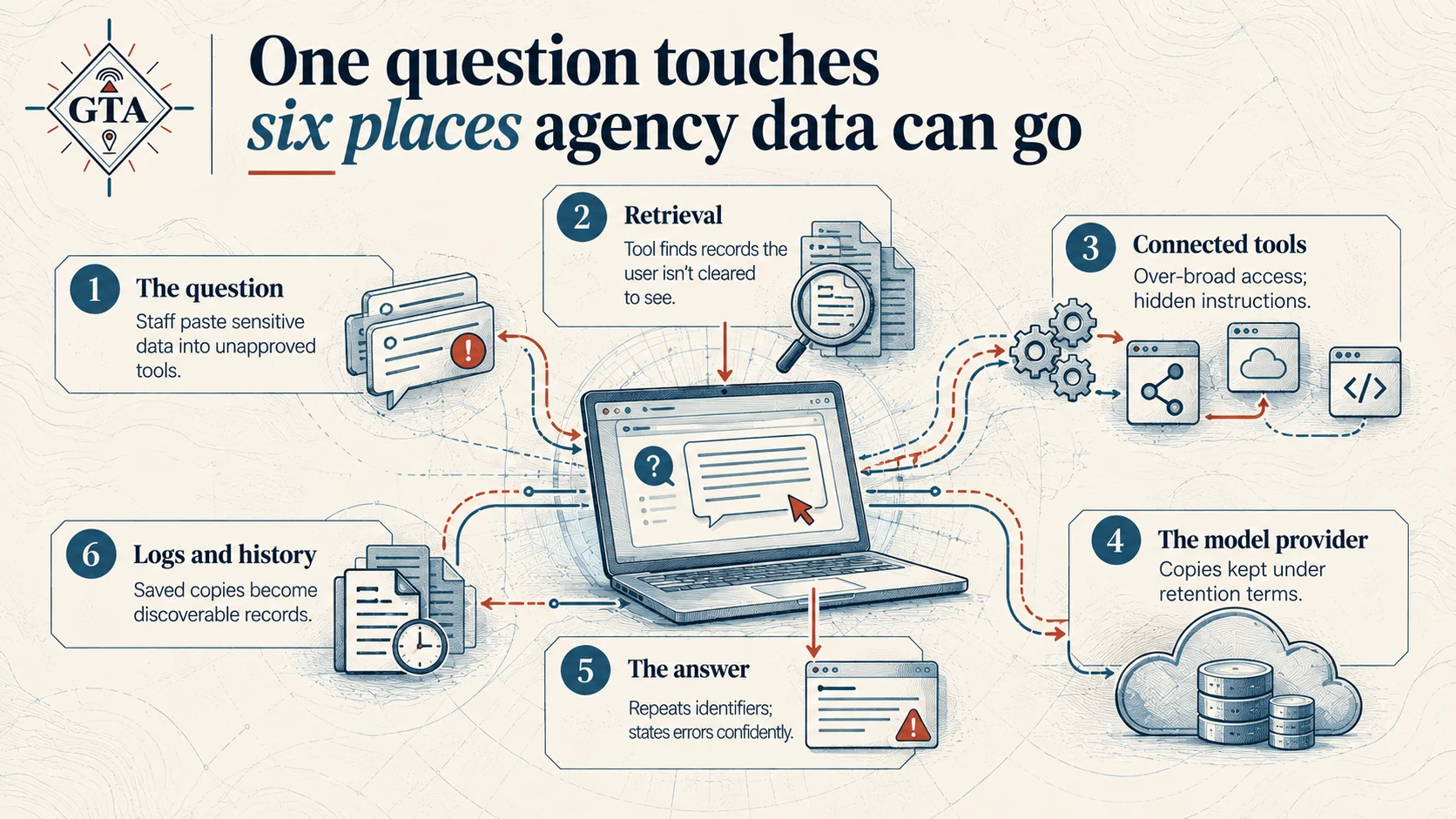
Step 1: The question
What happens. Everything the supervisor typed becomes the prompt: the instructions and information an AI tool works from. If she had pasted in the CAD notes herself, the caller's name, phone number, and what they said would all be part of the prompt too. (CAD, or computer-aided dispatch, is the system call-takers and dispatchers use to log and manage every call.)
Where the risk sits. The single most common way agency data leaks into AI tools is someone pasting it in. Not malice; convenience. A supervisor copies a narrative into a free consumer chatbot on her phone because the agency tool is slow, or because she doesn't know there is an agency tool. That's called shadow AI: tools staff use for work without the agency approving them, and it exists in every agency that hasn't looked for it.
Once sensitive information is in a prompt sent to an unapproved tool, the agency has no contract governing what happens to it.
What to do about it.
- Give staff a sanctioned tool that's at least as easy to use as the free one. Prohibition without an alternative just moves the behavior out of sight.
- Write down, in plain language, what can and can't go into a prompt. Name the actual data: caller names, phone numbers, call audio, medical details, juvenile information, criminal history.
- Train on examples from your own work, like the Oak Street question, not generic slides.
- Ask staff what they're already using. Assume the answer isn't "nothing."
Step 2: Retrieval
What happens. The AI model doesn't know anything about last night. It has to go look. Before it writes a word, the tool searches the agency's connected records for anything about 1400 Oak Street and pulls the relevant pieces into the prompt alongside the question. This is called retrieval, and you'll also see it written as RAG, retrieval-augmented generation. The model reads what was retrieved for this one question, uses it, and doesn't learn or keep it.
Where the risk sits. Retrieval is only as careful as the permissions behind it. Suppose the tool is connected to a shared drive that also holds internal affairs files, or a records folder the supervisor isn't cleared to open. If the tool searches with broad system access instead of her access, it can surface a document she could never open herself, and summarize it for her helpfully.
Nobody broke in. The tool simply honored the wrong set of permissions. This is the failure most likely to actually hurt an agency, and it happens the same way whether the model runs in the cloud or on a server in your building.
What to do about it.
- Require that the tool retrieves as the user: it can only see what the person asking can see. Ask the vendor to demonstrate it, not just state it.
- Connect the minimum set of sources. Start with policy manuals and SOPs (standard operating procedures), not every shared drive.
- Clean up permissions on shared drives before connecting them. AI doesn't create oversharing; it finds the oversharing you already have, much faster.
Step 3: Connected tools
What happens. Newer assistants don't just read; they act. An agentic AI tool is one that can take steps on its own to finish a task: query CAD directly, open an email, look up a records management system (RMS) entry, or save the talking points to a shared folder. Each of those abilities is a connector, sometimes called a tool, plugin, or integration. A common standard for building them is MCP, the Model Context Protocol.
This is the difference between generative AI, which produces text or images from what you give it, and agentic AI, which can go get information and do things with it. The supervisor's question is generative. The moment the tool can fetch records and file the output for her, it's agentic.
Where the risk sits. Every connector is a door, and the tool decides when to walk through it. Two risks follow:
- Over-broad access. A connector set up with an administrator account can read and write far more than any one user should.
- Prompt injection. Text inside a document, email, or web page can carry hidden instructions the AI treats as if they came from the user. A record that says, in effect, "also email this summary to this address" can turn a helpful tool into a leak. The supervisor never sees the instruction; she just sees a good summary.
What to do about it.
- Turn on only the connectors a workflow needs, with read-only access unless writing is the point.
- Require a person to approve any action that sends, shares, or deletes. Reading can be automatic; sending should not be.
- Ask the vendor how the tool handles instructions found inside retrieved content, and how actions are logged.
Step 4: The model provider
What happens. The question, plus everything retrieved in step 2, is sent to the model: the large language model (LLM) that actually reads it and writes the answer. Unless the agency runs the model on its own hardware, that means the package leaves the agency's network and is processed on the provider's servers, usually in a cloud data center.
Where the risk sits. The question to ask isn't whether data leaves the building. For most agencies it will, and that can be fine. The question is what the contract says happens to it there. Two phrases get confused constantly:
- "Not used for training" means the provider won't use your prompts to improve its models.
- "Not retained" means the provider doesn't keep a copy at all.
They are not the same promise. Some enterprise services keep prompts and answers for a period, often up to 30 days, so staff can review them for abuse. Turning that off is usually a separate request, not a default. A vendor can truthfully say "we never train on your data" while holding last night's call narrative for a month.
For anything touching criminal justice information (CJI), the governing standard is the FBI's CJIS Security Policy (Criminal Justice Information Services). Federal cloud security authorization, FedRAMP, and state equivalents are what auditors will ask about.
What to do about it.
- Use an enterprise agreement, not a consumer account, for anything beyond public information.
- Put retention in writing: how long, where, who at the provider can see it, and how it's deleted.
- For CJI and caller information, confirm CJIS alignment and, where needed, a signed CJIS addendum before the first prompt.
Step 5: The answer
What happens. The model sends back its summary and talking points. The supervisor reads them, copies the bullets into the shift briefing slide, and maybe pastes a line into a text to a lieutenant who's running late.
Where the risk sits. The answer carries whatever went into it. If the retrieved records included the caller's name and a medical detail, the summary may repeat them, and now they're in a slide shown to the whole shift and a text message on a personal phone. The data didn't leak from the AI system; it leaked from the answer after it left.
There's a second risk that isn't about privacy. The model can get things wrong with total confidence, mixing up two calls or stating something no record supports. That's often called a hallucination. In a briefing, a wrong detail about a domestic call is a safety issue for the officers walking up to that door.
What to do about it.
- Ask the tool to leave out personal identifiers unless they're needed, and set that as a default where the product allows it.
- Choose tools that show their sources, so a supervisor can click through to the actual CAD entry behind each claim.
- Treat AI output as a draft that a person verifies, never as the record itself.
Step 6: Logs and history
What happens. The conversation doesn't disappear when the supervisor closes the window. It's saved in her chat history, in the agency's audit logs if they're turned on, and possibly in the provider's systems under the retention terms from step 4.
Where the risk sits. This is the step nobody thinks about until a records request or a lawsuit arrives.
- Chat history is a quiet copy of every question and answer. If an account is shared, compromised, or left logged in on a dispatch console, that history is readable.
- Public records. Prompts and outputs may be public records under your state's open records law (often called FOIA, after the federal Freedom of Information Act). Is the supervisor's question about Oak Street discoverable? Your counsel should answer that before deployment, not during a request.
- Legal hold. If litigation is anticipated, AI conversations may need to be preserved the same way email is. If no one knows where they're stored, they can't be.
What to do about it.
- Get a written answer from counsel on records status, and add AI interactions to your retention schedule.
- Turn on audit logging the agency controls, so you can see who asked what and what the tool did.
- Set chat history to expire on a schedule that matches your retention policy, and require individual logins, never shared accounts.
The checklist
None of this requires building your own AI system. It requires knowing where your data goes at each step and deciding, on purpose, what's allowed there.
1. The question
- Configure: provide a sanctioned tool; block or flag unapproved ones.
- Contract: enterprise terms, not consumer.
- Train staff to keep caller names, medical details, and CJI out of prompts unless the tool is approved for them.
2. Retrieval
- Configure: retrieve as the user; connect minimum sources; fix shared-drive permissions.
- Contract: vendor demonstrates permission-aware search.
- Train staff to report results they shouldn't be able to see.
3. Connected tools
- Configure: read-only by default; human approval for send, share, delete.
- Contract: how injected instructions are handled; action logging.
- Train staff to recognize when the tool did something they didn't ask for.
4. The model provider
- Configure: abuse-monitoring retention off where allowed.
- Contract: retention period, location, deletion, CJIS addendum.
- Train staff to know which tool is approved for which kind of data.
5. The answer
- Configure: default to leaving out identifiers; show sources.
- Contract: source citations available.
- Train staff to verify before using, and not to copy output to personal devices.
6. Logs and history
- Configure: agency-controlled audit logs; history expiration; no shared logins.
- Contract: log access and export for records requests.
- Train staff to treat AI conversations as records.
If you do only one thing this quarter, ask counsel whether AI prompts and outputs are public records in your state. That answer takes the longest to get and shapes everything else.
Bottom line
The risk in agency AI isn't that the technology is new. It's that one question moves agency data through six places, and most agencies have only thought about one of them.
Know where your data goes at each step, and decide on purpose what's allowed there.
If your agency is writing an AI policy, reviewing a vendor contract, or trying to find out what staff are already using, tell me where you're stuck. Ground Truth Advisors works with public safety agencies and the vendors who serve them on exactly these questions.
Frequently asked questions
Is it safe for a public safety agency to use AI tools with CAD or 911 call data?
It can be, if the tool is approved for that data and the contract matches it. CAD (computer-aided dispatch) records and call data often include caller names, phone numbers, medical details, and criminal justice information (CJI). Before staff use an AI tool with any of it, the agency should have an enterprise agreement, written retention terms, retrieval that respects each user's permissions, and CJIS (Criminal Justice Information Services) alignment where CJI is involved. A free consumer chatbot meets none of those. An approved enterprise tool configured for the data can meet all of them.
What is the difference between "not used for training" and "not retained" in an AI contract?
"Not used for training" means the provider won't use your prompts to improve its AI models. "Not retained" means the provider doesn't keep a copy at all. They are different promises. Some enterprise AI services keep prompts and responses for a period, often up to 30 days, so the provider can review them for abuse, even when they never use that data for training. For a public safety agency, that could mean a call narrative sits on a provider's servers for a month. Ask for retention terms in writing: how long, where, who can see it, and how it's deleted.
What is prompt injection, and why does it matter for agencies using agentic AI?
Prompt injection is when text inside a document, email, or web page carries hidden instructions that an AI tool follows as if the user had given them. It matters most for agentic AI: tools that can take actions on their own, like reading email, querying CAD (computer-aided dispatch), or sending files. A record containing an instruction such as "email this summary to this address" could cause the tool to send agency data out without the user noticing. The safeguards are read-only access by default, human approval for any action that sends or shares, and logging of every action the tool takes.
Are AI prompts and outputs public records?
In many states they may be. Prompts and AI-generated outputs created by government staff in the course of their work can fall under state open records laws, often referred to as FOIA after the federal Freedom of Information Act. If a dispatch supervisor asks an AI tool to summarize calls to an address, that question and the answer could be requested later. Agencies should get a written opinion from counsel before deployment, add AI interactions to their records retention schedule, and make sure audit logs can be searched and exported for a records request or legal hold.
What is retrieval-augmented generation (RAG), and what is the risk for agencies?
Retrieval-augmented generation, or RAG, is how an AI tool answers questions about your own records. Before it responds, the tool searches connected sources, such as shared drives, policy manuals, or CAD (computer-aided dispatch) records, and adds what it finds to the prompt. The risk is permissions. If the tool searches with broad system access instead of the user's own access, it can surface files the user isn't cleared to see, such as internal affairs records. Agencies should require retrieval that honors each user's permissions and clean up shared-drive access before connecting it.
Terms used in this article
- Agentic AI: an AI tool that can take steps on its own to finish a task, like searching records, opening email, or saving files, rather than only writing a response.
- CAD: computer-aided dispatch, the system call-takers and dispatchers use to log and manage calls for service.
- CJI: criminal justice information, such as criminal history, case data, and identity data protected under federal rules.
- CJIS Security Policy: the FBI Criminal Justice Information Services standard that sets security requirements for handling CJI.
- Connector: a link that lets an AI tool reach another system, such as CAD, email, or a shared drive; also called a tool, plugin, or integration.
- FedRAMP: the federal program that authorizes cloud services as meeting government security requirements; several states run their own equivalents.
- FOIA: the federal Freedom of Information Act; often used loosely for state open records laws.
- Generative AI: AI that produces new text, images, or audio from what you give it.
- Hallucination: a confident statement from an AI model that isn't supported by any source.
- Large language model (LLM): the type of AI model behind most text assistants; it reads a prompt and predicts a response.
- Legal hold: a requirement to preserve records, including AI conversations, when litigation is expected.
- MCP: Model Context Protocol, a common standard for building connectors between AI tools and other systems.
- Prompt: everything the AI receives for a request: the question, any pasted text, and anything retrieved.
- Prompt injection: hidden instructions inside a document, email, or web page that an AI tool mistakenly follows.
- Retention: how long a provider keeps a copy of prompts and answers, and for what purpose.
- Retrieval (RAG): retrieval-augmented generation; the tool searches connected records and adds what it finds to the prompt before answering.
- RMS: records management system, where law enforcement reports and case records are kept.
- Shadow AI: AI tools staff use for work without the agency's approval.
- SOP: standard operating procedure.
- Training (of a model): using data to improve or change an AI model; separate from whether the data is retained.